Cover you Area

Start immediately seeing marine traffic in your area! Just install an AIS receiver and send us your data through any Internet connection.

Why to cover my Area?

Am I located in a proper area?

Any sea area in the world can be covered and shown on the real-time map. If you are located near an uncovered sea area (up to 10 miles from sea or more if at a high altitude), near a harbor or on top of a mountain (!) and you have a computer and any Internet connection always online, then you may start installing your AIS station.
The most important factors (but not mandatory) for a good reception is the elevation (height from sea level – the higher the better) of your location and the clear view to the horizon, without obstacles.

What equipment and software do I need?


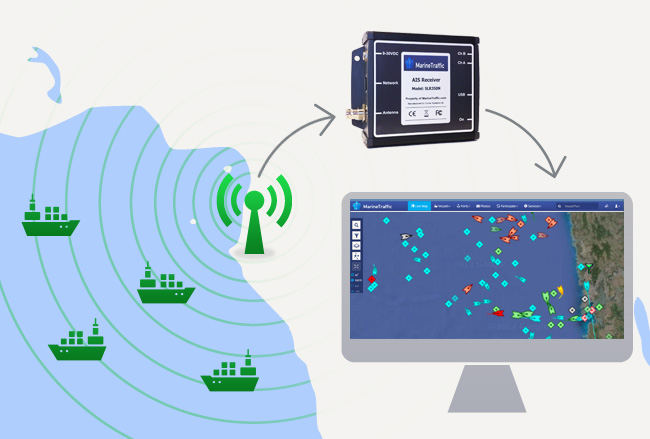
A typical base AIS station is shown on the picture above. Obtain and connect to your PC an AIS receiver with an external VHF antenna and send the collected data through your Internet connection. In detail:

1. You need an AIS receiver.
You may buy one from a local marine electronics shop or you may order one from an online shop.
We have tested the following devices with our software, with similar results:
If you are not sure whether your location is suitable for AIS data reception and thus you do not want to buy a device, we can lend you an AIS receiver unit, to try it. You will have to return it to us within one month.

2. You need a VHF antenna.
Any marine VHF antenna is suitable for AIS reception. A 5/8 type antenna seems to be better for a base station (see 1st picture). For a little better results you may get an high-gain VHF antenna (e.g. a 3 x 5/8 aerial) or an antenna specially designed for AIS, such as the "Shakespeare 396-1-AIS". Install the antenna at the highest possible point of your building.
If If you feel you can build your own handcrafted antenna, then you have many better options. Since in most cases the sea is not located around us but towards one direction, it is a very good idea to construct a directional (Yagi) antenna pointing to the sea (see 2nd picture). You can calculate the length of the antenna elements at this site: http://www.k7mem.150m.com/Electronic_Notebook/antennas/yagi_vhf.html (Remember to enter frequency 162 MHz). You may also try a custom made "Collinear" AIS antenna.
: A 5/8 VHF Antenna  : An array of two Yagi AIS antennas

3. You need a cable and the relevant connectors to connect the antenna with the receiver. The best choice for this cable is the RG-213 type. If the distance is shorter than 10 meters you may also use the cheaper RG-58 type. In any case, the length of the antenna cable must not exceed the 20 meters. You will also need a serial cable (a common RS-232 serial connection cable) to connect the AIS receiver with the computer. We have successfully tested a 15-meter serial cable.

4. You need a software
You need to download for free a simple software for processing and uploading data to the central database. It is a windows-based service program that runs on the background or in the foreground if you wish to keep an eye on it. It requires the existence of the Microsoft .NET 2.0 framework (if you do not have it already, you will be prompted to download it during the software installation).

Download the "AIS Logger" Software (zip file, about 0.7 MB)
Installation Notes:Run the installation package AisServiceSetup.msi and follow the steps until the end. The software requires the Microsoft .NET framework, which will be downloaded during the installation if you do not already have it. 
A windows service will be installed (named AIS Logger). Locate the service in (Right click) My Computer --> Manage --> Services. Configure the service to start Automatically and start the service. If you wish to see the AIS data collected and processed, check the option 'Allow service to interact with the desktop' at the 'Log on' tab, before starting the service (if you do so, please note that the program will stop when you log-off from windows). 

That’s all! Start seeing vessels in your area! Ask us to put in our our site a direct link to your area.


Alternative ways to send us your AIS data?

1. Avoid using a computer:
If you cannot or you do not wish to use a PC to process and send us your collected data, then you may use a receiver with an 'Ethernet' interface, which connects directly to the network (see the receiver COMAR SLR200Ν (~550 €). Alternatively, if your receiver has a serial port, then you may use a serial-to-ethernet converter that collects the data from the serial port of the AIS receiver and sends them directly to our server. In both case above, it is not necessary to use a computer and the "AIS Logger" software to send the collected data to the central server.
We have successfully tested the 'Digi One SP' Serial to Ethernet Converter (~ 150 €)
and the 'Netcom 10S' RS-232 to Ethernet Converter (~ 70 €)
The converter must be configured to send the data directly to the address '195.251.168.18', UDP port 5321. Please contact us if you need further support on this.

2. I am already using Shipplotter software to collect AIS data:
If you have already a receiving station and you are using the shipplotter software to process and publish your data, then you may easily send us your data without interrupting at all your current system. Just configure the Shipplotter to additionally send the data to our server.
Go to 'I/O settings' and locate the 'UDP peer-to-peer output section'. Enable the output to Remote IP '195.251.168.18', Remote port 5321. That's all.

I already have a wideband or a VHF receiver. Can I use it to collect AIS data?

If you already have a wideband receiver or a marine VHF radiotelephone, it is possible to use it to collect AIS data and send them to the central server, without buying a specialized AIS receiver. You have to follow the steps below:

Put a Live map of your area in your web site (optional)

You may put a part of our map that covers your area in your own web site. It is very easy to do this in three steps:

How much will it cost me?

We will not ask money from you and we will not give any money to you. This is an open, academic, community-based project. You will have to buy your own AIS receiver (indicative prices shown previously) and to spend not more than 80 euros for the antenna and the cables. We assume also that you already have a PC (anything with windows 2000, XP, Vista, with more than 256MB of RAM would be fine) and an Internet connection. If however you are a vendor or merchant of AIS equipment, a donnation of equipment (AIS receivers) will be more than welcome.

Need Help?

We can support you to build your AIS station. Do not hesitate to send us an email at marinetraffic@aegean.gr. You may also find an answer in the Frequently Asked Questions.